/4 min read
Domain Name System (DNS) and How it works
System Design is not just for Architects. It is for every developer who is building scalable and maintainable applications for global audience.
B
Bikash JaiswalSenior AI Engineer
System Design is not just for Architects. It is for every developer who is building scalable and maintainable applications for global audience.
To connect to a website, we remember website name like www.example.com. However, the internet's underlying technology
works with numerical IP addresses to connect to the website. So how does the internet translate a name to correct IP
address? The internet uses a system called Domain Name System (DNS) to translate a name to correct IP address.
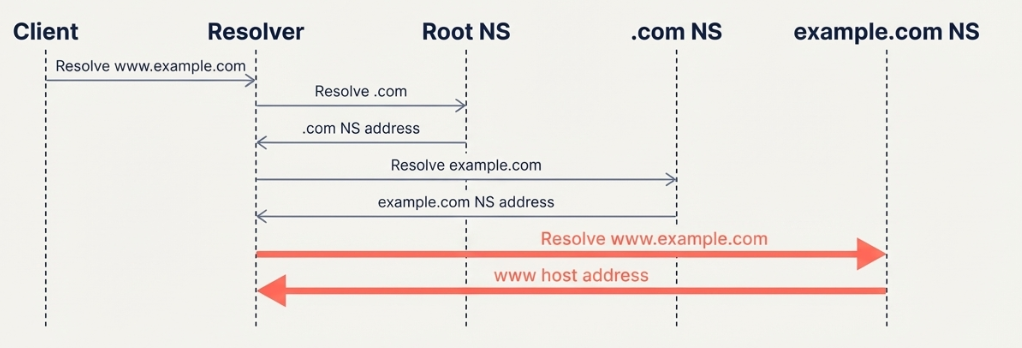
When we type www.example.com in our browser, our browser first checks the local cache for the IP address of www.example.com.
If the IP address is not found in the local cache, our browser sends a request to the DNS resolver to resolve the IP address of www.example.com.
The DNS resolver checks its own local cache first. If the address isn't found in the local cache, it starts the process of resolving the IP address from top level domain (TLD) server. It sends a request for .com to the Root Name Server (NS). The Root Name Server (NS) doesn't know the final answer, but it knows who manages the .com domain. It responds with the address of the .com TLD server.
With .com TLD server, the resolver now send it with more specific request for www.example.com. The .com TLD Name Server knows authoritative name servers that manage example.com and responds with the address of the authoritative name server for example.com.
Finally, The resolver queries the authoritative to get record for the www hostname and returns the IP address to the browser.
The browser then uses the IP address to connect to the website.
In the worst case scenario, resolving a single domain name involves multiple round trips to different servers across the internet. If every request requires this full lookup process, the web will be slow. To avoid this, DNS caching is used.
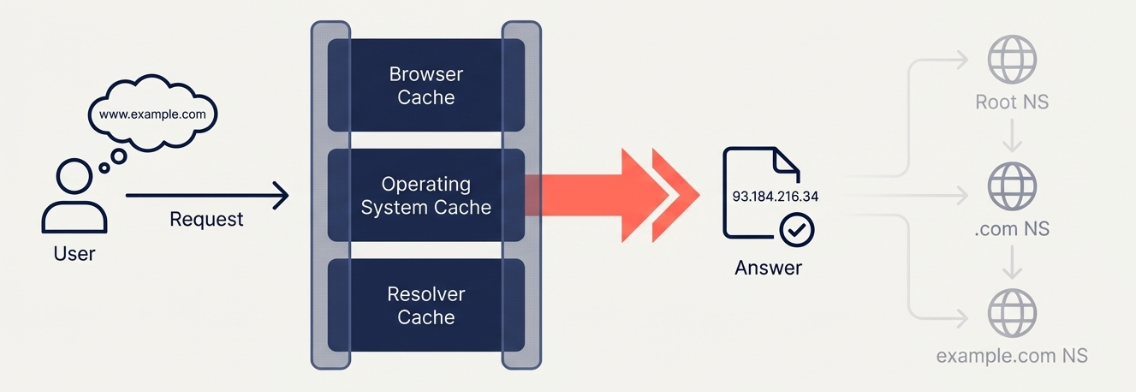
To reduce latency and load, DNS relies heavily on caching. Since the mapping for domain names to IP addresses doesn't change often, DNS servers cache the results of DNS queries for a period of time. This means that when a user requests a domain name, the DNS server can return the IP address from its cache instead of having to perform a full lookup process.
DNS cache expires after a certain period of time. The expiration time is determined by the TTL (Time To Live) value in the DNS response. The TTL value is set by the DNS server, and it is the maximum time that a DNS record can be cached by a DNS client. The TTL value is usually set to a value between 1 hour and 1 week.
DNS TTL comes with tradeoffs. If the TTL is too short, the DNS server will have to perform a full lookup process for every request, which will be slow. If the TTL is too long, the DNS server will have to perform a full lookup process for every request, which will be slow. DNS can easily become a single point of failure. If DNS server goes down, the client resolve IP address of services and hence the website will not be accessible.
To avoid single point of failure, DNS servers are replicated across multiple servers. Making it a distributed system.
DNS uses UDP for communication, which is a connectionless protocol. This means that it doesn't have a connection to the server, and it doesn't have a way to verify the identity of the server. NO TLS encryption present in UDP thus eavesdropping is possible.
The updates to the DNS records are not immediately visible to all DNS servers. This is because the DNS servers cache the records for a period of time. This is called eventual consistency.
DNS is the internet's essential hierarchical lookup system, translating human-friendly names to machine-readable IP addresses. The resolution process involves multiple steps, including a lookup of the root name server, a lookup of the top-level domain name server, and a lookup of the authoritative name server. Its real world performance relies on delicate balance of caching and TTL. These create tradeoffs between fast updates (agility) and lower server load and impact outrages (resilience).